Page 2 of 3
Re: Game crashes after a few minutes
Posted: Wed Apr 12, 2023 6:29 pm
by Aged Code
Form the shell type:
version <partition where the game is installed> full
For example:
version DH1: full
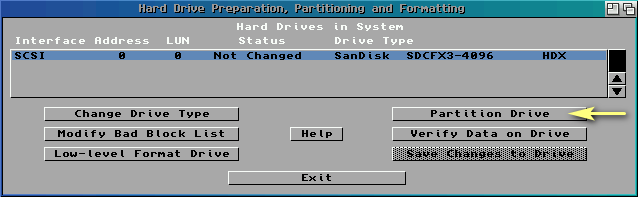
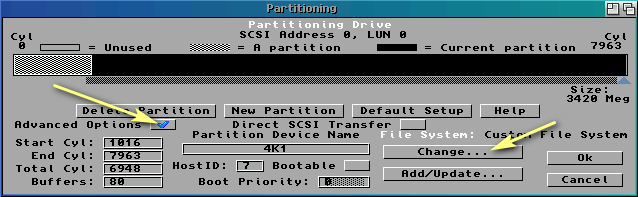
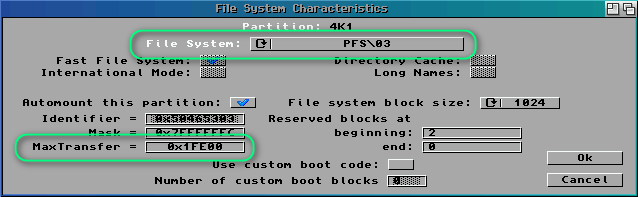
MaxTransfer (and filesystem too) can be checked in HDToolBox:
- hdtooldbox1.png (6.51 KiB) Viewed 21754 times
- hdtooldbox2.png (10.81 KiB) Viewed 21754 times
- hdtooldbox3.png (10.88 KiB) Viewed 21754 times
Re: Game crashes after a few minutes
Posted: Wed Apr 12, 2023 8:47 pm
by pellejones
Ok!
Filesystem 45.9 (1995-03-30)
File system: Standard File System
Max transfer: 0x1FE00
Re: Game crashes after a few minutes
Posted: Thu Apr 13, 2023 6:43 am
by Aged Code
That seems to be alright.
One more question. What's your partition size?
Re: Game crashes after a few minutes
Posted: Thu Apr 13, 2023 3:25 pm
by pellejones
1702 MB
Re: Game crashes after a few minutes
Posted: Thu Apr 13, 2023 4:07 pm
by Aged Code
OK, then we can rule out too big partition and scsi.driver problem.
One more suggestion. Can you test the game on an emulator? WinUAE or FS-UAE, doesn't matter.
If you need a ready-to-use HDF file with the game, I can provide the link on PM.
Re: Game crashes after a few minutes
Posted: Thu Apr 13, 2023 4:41 pm
by pellejones
Right, so I have my Amiga 1200 CF as a HDF version as well, and tried it there. Same programs, versions, startup-sequence etc. First the game crashed back to Workbench with the "returned to the surface" or something as soon as I hit the menu.
Then I booted a clean install of workbench as a HDF, and the game ran just fine.
Then I booted the Amiga 1200 CF HDF, but without ACATune, and then the game worked just fine. So I thought "it must be ACA TUNE!". Adding ACATune back to User-startup, the game ran fine anyway.
So I have no idea what is going on. I guess I have a spare CF that I can reinstall a clean WB on, but I am very happy with my current installation

Re: Game crashes after a few minutes
Posted: Thu Apr 13, 2023 4:44 pm
by pellejones
Here are my two startup thingies.
User-Startup
Code: Select all
SYS:C/ACATune
;BEGIN MUI
if exists "Work:MUI"
   assign MUI: "Work:MUI"
   if exists MUI:Libs
      assign add LIBS: MUI:Libs
   endif
   if exists MUI:Locale
      assign add LOCALE: MUI:Locale
   endif
   version >nil: exec.library 39
   if not warn
      if exists MUI:Docs
         if exists HELP:dummy ; do not remove
         endif                ; this entry!
         assign add HELP: MUI:Docs
      endif
   endif
endif
;END MUI
;BEGIN MUI ASL
if exists "Work:MUI"
   run <>nil: MUI:PatchASL
endif
;END MUI ASL
Code: Select all
; $VER: Startup-Sequence_HardDrive 40.2 (25.2.93)
; Startup-Sequence for hard drive systems

C:SetPatch QUIET

; Adds icons
C:Loadmodule libs:icon.library

C:Version >NIL:
C:AddBuffers >NIL: DF0: 15
FailAt 21

C:MakeDir RAM:T RAM:Clipboards RAM:ENV RAM:ENV/Sys
C:Copy >NIL: ENVARC: RAM:ENV ALL NOREQ

Resident >NIL: C:Assign PURE
Resident >NIL: C:Execute PURE

Assign >NIL: ENV: RAM:ENV
Assign >NIL: T: RAM:T
Assign >NIL: CLIPS: RAM:Clipboards
Assign >NIL: REXX: S:
Assign >NIL: PRINTERS: DEVS:Printers
Assign >NIL: KEYMAPS: DEVS:Keymaps
Assign >NIL: LOCALE: SYS:Locale
Assign >NIL: LIBS: SYS:Classes ADD
Assign >NIL: HELP: LOCALE:Help DEFER

BindDrivers
C:Mount >NIL: DEVS:DOSDrivers/~(#?.info)

IF EXISTS DEVS:Monitors
  IF EXISTS DEVS:Monitors/VGAOnly
    DEVS:Monitors/VGAOnly
  EndIF

  C:List >NIL: DEVS:Monitors/~(#?.info|VGAOnly) TO T:M LFORMAT "DEVS:Monitors/%s"
  Execute T:M
  C:Delete >NIL: T:M
EndIF

SetEnv Language "english"
SetEnv Workbench $Workbench
SetEnv Kickstart $Kickstart
UnSet Workbench
UnSet Kickstart

C:AddDataTypes REFRESH QUIET
C:IPrefs
Work:FullPalette/FPPrefs
C:ConClip

Path >NIL: RAM: C: SYS:Utilities SYS:Rexxc SYS:System S: SYS:Prefs SYS:WBStartup SYS:Tools SYS:Tools/Commodities

IF EXISTS S:User-Startup
  Execute S:User-Startup
EndIF

Resident Execute REMOVE
Resident Assign REMOVE

C:LoadWB
EndCLI >NIL:
Re: Game crashes after a few minutes
Posted: Thu Apr 13, 2023 6:03 pm
by pellejones
OK I noticed one more thing on the real harware. If I do nothing in Paris Port, it does not crash. At least not this time. But as I click the conversation forward, it freezes (but not the mouse) then crashes, like all other times.
In the settings of the game it says I have:
Chip: 2 MB Free: 84 104 bytes
Fast: 9 MB Free: 3 330 880 bytes
Re: Game crashes after a few minutes
Posted: Thu Apr 13, 2023 7:15 pm
by Aged Code
Your startup-sequence and user-startup look good.
However, free Chip is very, very low. No wonder the game crashes. Please, disable music and SFX and see if that changes anything. If so, we'll look for the reason why you have so low Chip mem free. But first, let's see without music and SFX.
Re: Game crashes after a few minutes
Posted: Fri Apr 14, 2023 5:14 pm
by pellejones
This is so strange. Now I made sure to have lots of chip ram. Booted the game with 1.9 MB free.
Looked at the info in game and I had chip mem 486 656 bytes free this time.
So I browsed the menues for a while and just as I was about to turn off music it crashed with the same error code as the first time. This time no grahpical bug. And as always I can move the cursor but it does not accept any button inputs on mouse or keyboard.
I am beginning to suspect that the culprit is ACAtune or the aca1221 hardware.